
The Design Process
Offering free professional design on our print products is what sets us apart from the other online printers who want you to use their templates to create your material. We try to make it as simple as possible for you to let us know what you would like your products to look like through the following process:
Once you have ordered your product(s) through this website you’re ready to send us the files we’ll need to create your design(s). As a minimum, your design files should include:
- Your design brief – a file containing a rough outline of what you would like included in your design, supplied as a Word document, text file etc
- Any graphics (including logos) to be included in the design
- (Optional) if you’re asking us to reproduce an existing design, please supply a photo, screenshot or previous design file to reproduce, along with any graphics (such as logos) to be included in the design
Your design brief can be created any way you like – as a Word document or text file, an email, a hand written note or sketch on a napkin photographed on your phone – whatever works for you. It should include any text you would like included in your design.
Your graphics will probably include your brand logo and any graphics or images you would like included. Graphics (such as logos) should be supplied as vector files wherever possible. Vector files can be scaled up or down with no loss of quality, recoloured or adjusted. They will be in one of these file formats: EPS, PDF, AI.
Images (and logos in image format) are fine as long as they are large enough to print clearly. For every inch (or 25mm) in width you would like an image printed, it should be 300 pixels wide. So, for example, an image printed on a business card at 2 inches (50mm) wide should be at least 600 pixels wide. An image printed on a compiment slip at 8 inches (200mm) wide should be 2400 pixels wide. Image file formats are: JPG, JPEG, PNG, TIF, GIF, BMP, WEBP.
If you’re unsure about the suitability of your graphics and images, just ask us for advice. Email us at studio@puuq.co.uk with your order number and question and we’ll have a look for you.
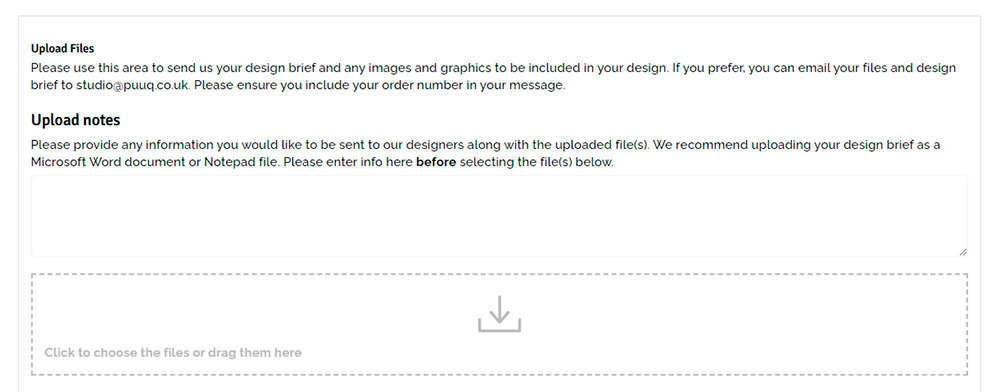
When you have completed the checkout process you will be taken to your order confirmation page. Here you will be asked to upload any files to be used in your design. You can also access the file upload system by going to My Account>Orders and clicking on your order number.
If you’d like to add any notes regarding the files you are uploading please do that before clicking the upload box or dragging your files into it. Once uploaded, your files will appear in your order details.
If you prefer, you can email this information to us at studio@puuq.co.uk. Please ensure you include your order number in the email subject so we can identify your job.
As soon as you’ve sent us your design brief and files, we’ll begin work on your design(s). We aim to have a draft design back to you for approval within 1 working day of placing your order and supplying your design files. We will send you a low-resolution draft (or proof) in PDF format to review, you can either approve this for print if you’re happy, or request changes.
If you request changes we will aim to have a new file back to you for review as quickly as possible, always aiming to turn around a design request within 1 working day from receiving it. The time it takes to issue a new draft/proof depends upon the extent of the changes you require.
We will repeat this process until you are happy with your design and give us approval to print via email.
Once you have approved your design it will be entered into the print queue and processed within the print time you chose at the time of ordering. It will be delivered free of charge to your chosen address by DPD and you will receive information regarding your delivery details at the time of despatch.
For detailing information regarding delivery, please visit the Delivery Information page.