
The Ordering Process
At puuq, we want to make the process of ordering your print as simple as possible. Printing is manufacturing, therefore we’re not just picking a product from a warehouse shelf and shipping it to you, we’re making something from scratch. When you order from puuq, you will go through the following process:
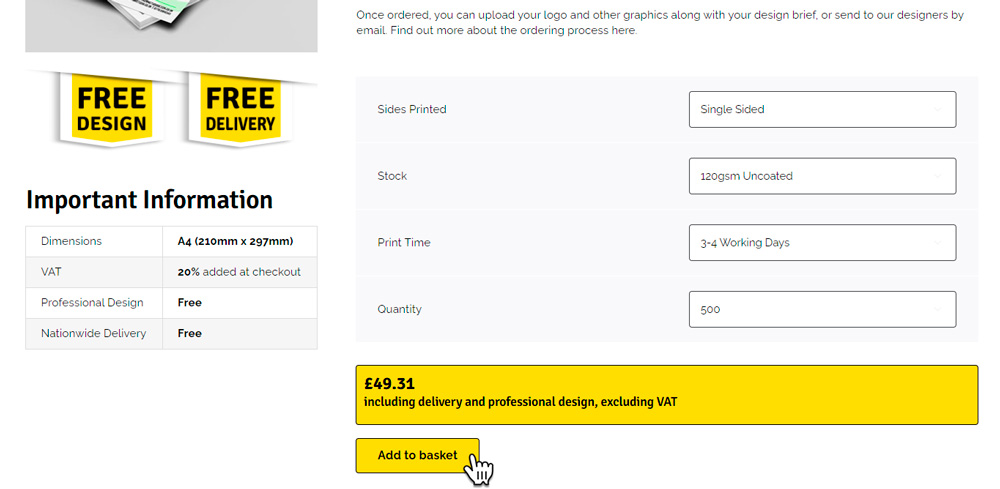
Every puuq print product starts with you picking a material, or stock. The printed design will be added to one side or both sides, and a lamination can be added to silk or gloss stocks if desired (this is a thin film, not the thick clear plastic encapsulation people sometimes add themselves). Corners can be rounded on some products if desired. You select a print time from the options available, and the quantity you would like.
The system will take all your options and calculate a price. This price includes free professional design and free delivery, but excludes VAT. Once you’re happy with your selections, please click the button to ‘Add to basket’.
If the price doesn’t show, and instead you receive the message ‘Sorry, no products matched your selection. Please choose a different combination’, this means that some of your selections are incompatible. This will usually be because you’ve selected lamination with an uncoated paper or card, we can only laminate on coated stocks.
Once you have added your products to your basket, click on the basket icon at the top of the page. From there, click the ‘Proceed to Checkout’ button. You don’t need to supply any information regarding your designs at the checkout stage, you’ll be able to do that once checkout is complete.
If you already have an account with us, log in during step 1. If not, enter your email address and check the box ‘Create an account’, this will enable you to access all your order details, file uploads and design notes. Complete the fields required in steps 2 and 3, then enter your payment details in step 4 to complete your order.
When you have completed the checkout process you will be taken to your order confirmation page. Here you will be asked to upload any files to be used in your design. If you’re not quite ready to do this don’t worry, you can log in to your account any time and add files to your order(s).
As a minimum, your design files should include:
- Your design brief – a file containing a rough outline of what you would like included in your design, supplied as a Word document, text file etc
- Any graphics (including logos) to be included in the design
- (Optional) if you’re asking us to reproduce an existing design, please supply a photo, screenshot or previous design file to reproduce
If you prefer, you can email this information to us at studio@puuq.co.uk. Please ensure you include your order number in the email subject so we can identify your job.
For detailed information, FAQs and guidance, please visit the Design Process page.
Our designers will begin working on your design(s) immediately, and you will receive a first draft by email within 1 business day of placing your order. From here, you can request changes to the design, or approve the artwork for print. This process will be repeated as often as necessary, at no cost to you, until you are completely satisfied with your design.
For detailed information, FAQs and guidance, please visit the Design Process page.
Once you have approved your design it will be entered into the print queue and processed within the print time you chose at the time of ordering. It will be delivered on a next-day basis*, free of charge to your chosen address by DPD and you will receive information regarding your delivery details at the time of despatch.
For detailed information regarding delivery, please visit the Delivery Information page.
*Delivery addresses in the Scottish Highlands, Northern Ireland and off-shore islands may take an additional working day.